One Pass Type-in: The Pages

Type-in Example

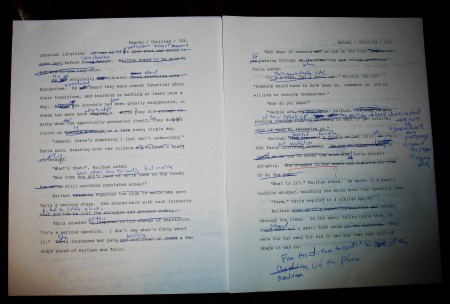
I figured some of you may be wondering what the pages I’m working on now look like (or not, but I wanted to break up the word count posts). Here are two random pages from the current stack on my document holder. This are pretty representative. Some pages have only one correction, some are crossed out entirely, and some have little circled numbers, referring me to the new handwritten scenes to insert.

Also, congratulations to Kathleen Bolton who just finished a One Pass Revision, and posted her thoughts on the process.

1-Pass Day 26 (47242/99806)

Type in
47242/99806

I really wanted to finish the new chapter so I got up early to finish it before leaving for work. Next time I’ll be back to more standard type-in stuff. I managed to reuse some material I had cut on my first failed revision attempt. It didn’t work at all before, but it fell right into place at the end of the new chapter.

1-Pass Day 18: (23882/99608)

Type in
23882/99608

Made some progress this morning. It’s hard to get back into it again after almost a week off. I need to try and make some time every day, even if it’s just for one scene. The current section is moving pretty fast, but I have the feeling I need to reshuffle some scenes here and there still.

1-Pass Day 15: (12485/99973)

Type in
12485/99973

Today didn’t go at all to plan. We had a pile of places to be today, but Rachel isn’t feeling herself, so we ended up staying home. On the plus side Denise was kind enough to give me time to work on the book (thank you!), so here I am posting an update. Some of the chapters look a bit shorter that I want them, but I’m going to finish the type in and think about what to do afterwards (if anything).

Not Happy

Things haven’t been going well lately. Not in any way. So far, today continues that trend.

I got up early to work on my type in. My current speed is about ten minutes per page to get it done. I’ve got over 500 pages left, so that’s well over 80 hours of work left if I don’t manage to speed up somehow. So I don’t need additional setbacks.

I mentioned before that I started doing revisions in WriteWay Pro. It’s pretty good in a lot of ways. After finishing two scenes this morning I thought I should do a global search and replace on a changed character name. Now I’m used to working in OpenOffice.org where this same type of activity on this same size document is fairly speedy. Also I have OpenOffice.org set up to auto-save a copy of the file every few minutes. I do this because when I get working I loose track of things like real life. I’m sure you can see where this is going. After watching the simple Search & Replace peg my CPU usage at 100% for about 20 minutes and error came up. When I clicked “OK” WriteWay Pro just went away. Not good.

I opened WriteWay back up, looked at where my edits left off and mourned the last hour of my life which was a complete and utter waste of time. Now I have to go to work, so here’s to yet another day with no writing progress.